Mistral Vibe AI Integration (OnePageCRM MCP)

Mistral's Vibe can work directly inside your OnePageCRM account. Once connected, ask for what you want in your own words, and Vibe does it in the CRM, whether that's pulling up a contact, logging a call, moving a deal, or writing a follow-up.


  • You need a paid Mistral Vibe account to connect it to OnePageCRM.
  • You need an active OnePageCRM account.

In this article:

Connect OnePageCRM to Mistral Vibe
Choose what the AI can change
Switch it on in each chat


Connect OnePageCRM to Mistral Vibe


1
In Vibe, open ContextConnectors → click + Add Connector.

Mistral | Context | Connectors | + Add Connector


2
Pick Custom MCP Connector → fill in the two fields → click Connect.

  • Title - OnePageCRM
  • Server - https://app.onepagecrm.com/mcp
  • Authentication Methode - OAuth2.1
  • Mistral | Custom MCP Connector


    3
    Find the new connector → click +Connect.

    Mistral | Custom connector | Connect


    4
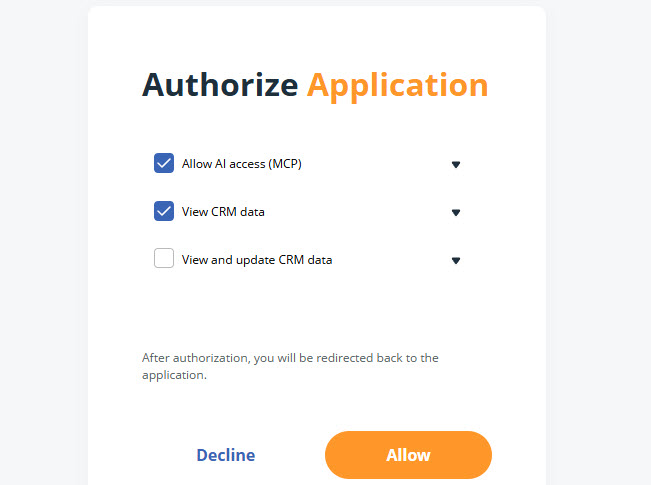
    Sign in to OnePageCRM → select the access level → click Allow.

  • Allow AI access (MCP) (required)
  • View CRM data (required)
  • View and update CRM data (optional)
  • OnePageCRM | Authorize AI tool


    5
    Vibe returns you to the Connectors page with OnePageCRM connected.

    Mistral | Custom connector | OnePageCRM


    Choose what the AI can change

    Jump up to Article's Overview ⮝

    1
    In Vibe, go to ConnectorsOnePageCRMFunctions.

    2
    Each function has its own toggle:
  • Create - Allows Vibe to add new contacts, Deals, and Notes.
  • Update - Allows Vibe to edit existing contacts, Deals, and Notes.
  • Mistral | Connectors | OnePageCRM | Functions


    💡 Each function can be enabled or disabled separately


    Switch it on in each chat

    Jump up to Article's Overview ⮝

    Vibe doesn't keep the connector running everywhere.


    Click + in the message box → hover over Connectors → tick OnePageCRM.

    Mistral | New chat


    💡 Vibe doesn't keep the connector running, so you’ll need to do this for new new chats.

    Did this answer your question? Thanks for the feedback There was a problem submitting your feedback. Please try again later.

    Still need help? Contact Us Contact Us