
Constant Contact

Constant Contact is an email marketing tool.

With the help of the Constant Contact Widget in OnePageCRM, users can quickly integrate their CRM account with Constant Contact and easily review previous Email Campaigns that are connected to contacts saved in the CRM.


  • You need a Constant Contact account to connect it to OnePageCRM.
  • Only  Account Owner or Administrators can configure and manage the integration.

In this article:

Enable/Disable the Constant Contact Widget Find/Use the Constant Contact Widget


Enable/Disable the Constant Contact Widget

1
Go to Constant Contact under Apps and Integrations → click Install.

Apps and Integration page l Constant Contact


2
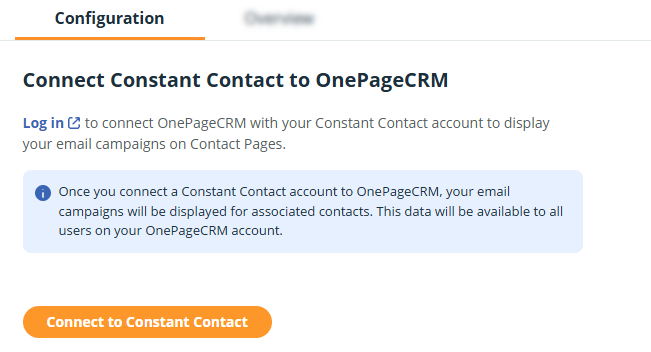
On the Configuration tab click on Connect to Constant Contact.

Constant Contact | Configuration page l Connect to Constant Contact


3
Log into Constant Contact and allow OnePageCRM to show past campaigns on the relevant contact.


Find/Use the Constant Contact Widget

Jump up to Article's Overview ⮝

1
Open a contactscroll down to the Constant Contact widget above the Contact Timeline → click on it to expand.

Constant Contact Widget app displayed above the Contact Timeline.


2
Once expanded, it will display:

  • Date - Date when an email was sent.
  • Subject - Email campaign name or Automation email subject sent to the contact, including a link to the Marketing Dashboard of the email in Constant Contact.
  • Constant Contact Widget app displayed above the Contact Timeline expanded.

    Did this answer your question? Thanks for the feedback There was a problem submitting your feedback. Please try again later.

    Still need help? Contact Us Contact Us