
Restore subscription

You can easily restore your subscription before your current billing cycle ends.

Only the Account Owner can restore the subscription.

In this article

Restore the subscription
Resubscribe to OnePageCRM

Restore the subscription

If you canceled your subscription and changed your mind, you can restore it before the end of your current billing cycle.
1
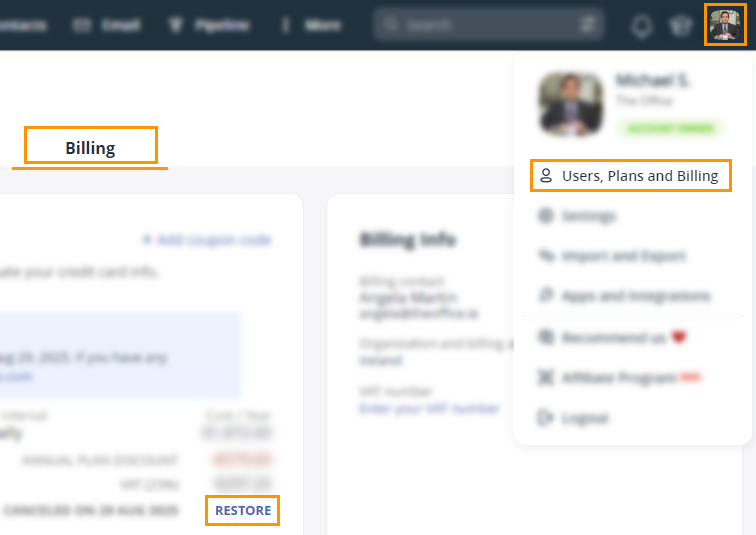
Go to Billing → in the Your Current Plan section click RESTORE.

2
Once you restore your subscription, you’ll be charged automatically on your next billing date.

Resubscribe to OnePageCRM

If your subscription is canceled or your trial account has expired, you can resubscribe to your OnePageCRM account to pick up where you left off.
1
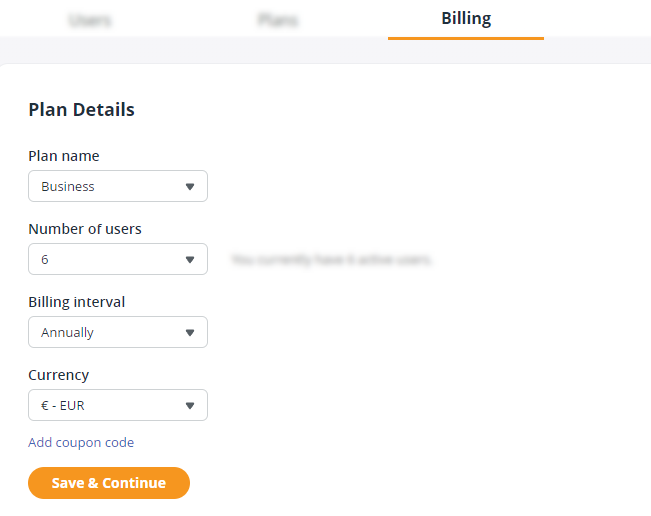
Go to Billing. Your previous subscription plan details are displayed here.

2
Update your Plan Details as needed:

  • Plan name
  • Number of users
  • Billing interval

  • → click Save & Continue.

    3
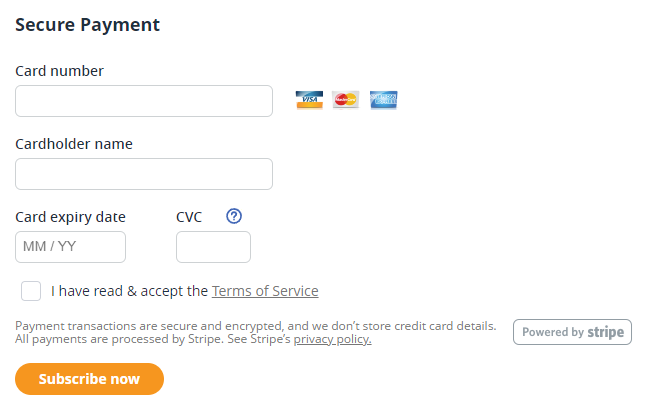
    In the Secure Payment section, enter your credit card details and tick I have read & accept the Terms of Service → click Pay now.

    Your card will be charged immediately.

    You can only resubscribe to the account if it has not been deleted.

    The currency is set when you first signed up and can’t be changed when you resubscribe.

    Did this answer your question? Thanks for the feedback There was a problem submitting your feedback. Please try again later.

    Still need help? Contact Us Contact Us